Tools and approvals
Mob’s shared instructions ask it to preserve the user’s scope, clarify missing targets, distinguish tool evidence from assumptions, and report unfinished work. Tool results, quoted content, memories and summaries do not grant permission. Installed skills guide the task within the user’s request and tool permissions. Cleared instructions should be loaded again when needed. Denied or revoked actions must not be rerouted through another tool, and an uncertain side effect must not be repeated just to discover whether it worked. These instructions complement the runtime approval checks described below.
The model works through tools. Any tool may ask the owner to approve a call before it has an effect, and the owner can decide from any client or channel.
Built-in and plugin tools
Section titled “Built-in and plugin tools”- Built in:
datetime,remember(saves a fact after approval, below), when the sandbox is enabled,sandbox, and, while there are tools to load,tool_search(below). - The email plugin offers
email_inbox,email_readandemail_send; the Cloudflare plugin offerscloudflare. Each is defined in its own package and offered only while its plugin is enabled. - Coding agents add
task_start(asks for approval),task_plan(asks for approval),tasks,task_message,task_stop,task_diff,task_check(asks for approval) andtask_review(asks for approval). - Schedules add
schedule(asks for approval),schedulesandschedule_cancel. - MCP servers add
mcp__<server>__<tool>tools, andtool_installinstalls a remote server from the catalog. - While any skill is installed, the
skilltool loads one; it reads without approval. - An
ownerOnlytool is offered only to the owner’s turns, and only the owner can approve its calls: another allowed WeChat user cannot read or send the owner’s mail. Plugin and MCP tools are owner-only. - Mail text and Cloudflare results sent to the model are bounded, and the model is told they are untrusted data.
Saved facts
Section titled “Saved facts”remembersaves one fact (up to 2000 bytes) once it is approved. A fact the owner approved is read in every one of the owner’s turns, in any conversation, client or channel; one another caller approved is read only in the conversation that saved it. Other callers’ turns never read the owner’s facts from elsewhere.- Facts go into the system prompt as data, not instructions.
/memorieslists them with where each is read, and/forget ID|alldeletes them; both are owner-only. - Facts saved before 2026-10-20 stay with their conversation: Mob cannot tell who approved them. Ask the model to remember one again to share it.
Exposure and tool_search
Section titled “Exposure and tool_search”Registering a tool and declaring it to the model are separate, so many tools
cost the prompt nothing until a task needs them. Tool.exposure is one of:
direct, the default: declared to every turn that may use the tool. Built-in and plugin tools are direct.deferred: declared oncetool_searchloads it. MCP tools are deferred unless their server’s configuration says otherwise.hidden: never declared and never found.
While a turn has deferred tools to load, or entries such as skills to find, it
offers tool_search, and the system prompt names how many wait in each
namespace (“MCP server github (12)”). tool_search takes keywords and ranks
what is waiting with BM25 over the tool’s name, namespace, description and
parameters (camelCase and _ split, Han characters one word each); a query
naming a tool exactly finds it first. It returns up to five results, ten when
asked, and loads the tools among them: they are declared, with their prompts,
from the turn’s next step. Calling a deferred tool that is not loaded, even
beside the search that loads it, fails with an unsupported-tool error.
A conversation keeps the tools it loaded, and those it called before, declared in its later turns: they are read back from its history, so nothing else is stored. Loading changes no approval: a loaded MCP tool asks as it always does.
ToolRegistry.registerEntries adds things tool_search finds that are not
tools to load, each with a kind, a description and how to use it, such as a
skill and the tool that loads it. Owner-only entries are found only in the
owner’s turns.
What asks for approval
Section titled “What asks for approval”- Reading runs at once. Sending mail, Workers AI (
ai.run, andvectorize.query, which embeds with Workers AI), D1 queries that may write,remember, every MCP call, installing an MCP server withtool_install, starting a coding task or plan (task_start,task_plan), running atask_checkcommand, starting a review squad (task_review) and scheduling a prompt wait for approval. A single D1SELECTstatement runs without approval; SQL the check cannot be sure of still asks. - The approval names what the call acts on (the sender and SMTP account, or the Cloudflare account and model, index or database), and an approved call runs only while the configuration still names the same target, so changing the configuration cannot redirect it.
Deciding
Section titled “Deciding”Approval decisions require a boolean approved value. Malformed decisions are
rejected before changing the pending approval or running its tool.
- An approval request carries the tool name and the input to approve.
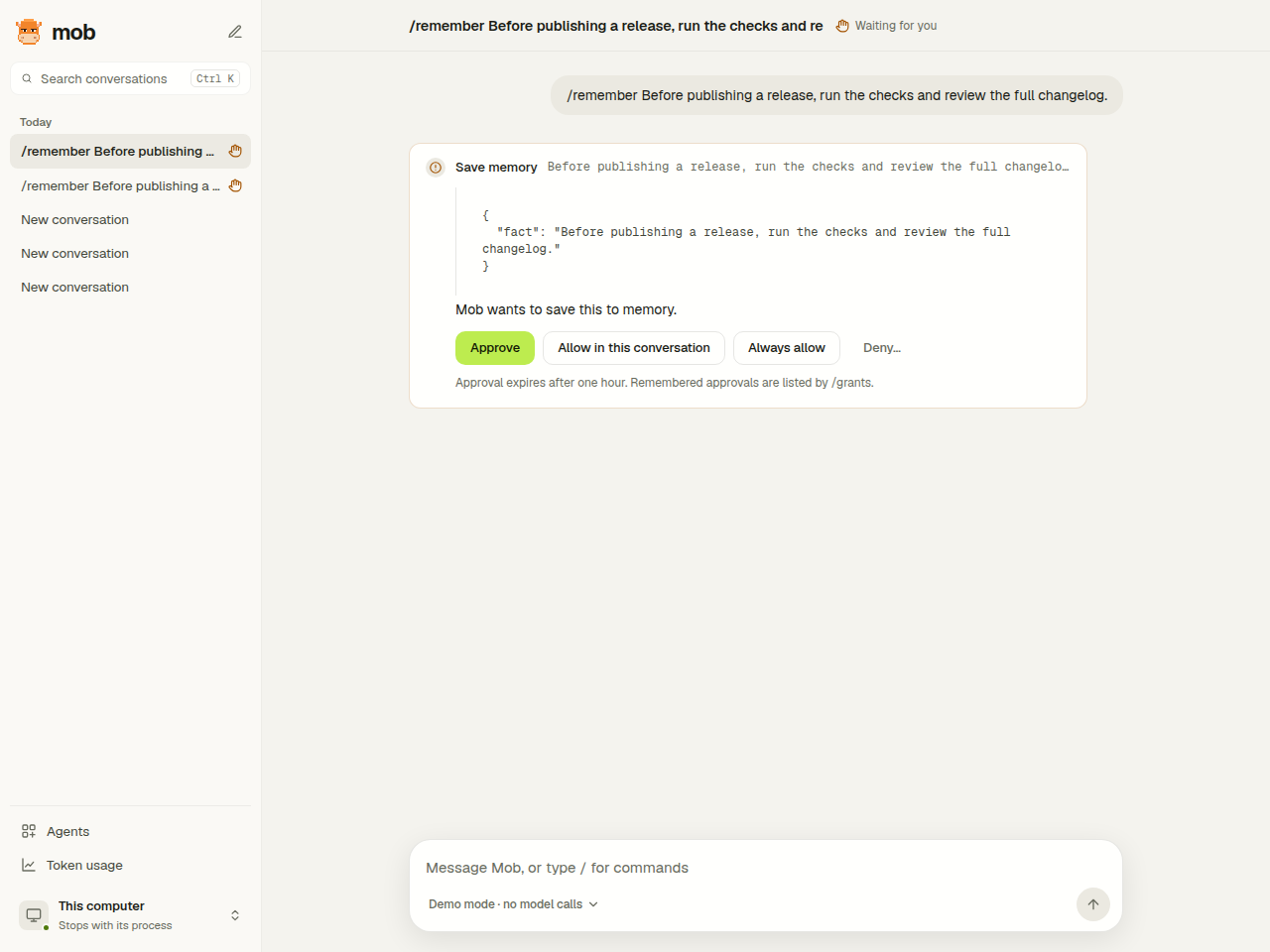
describeApprovalrenders it as plain text for channels. The AI SDKtool-approval-requestchunk carries only the approval and call IDs. - Before an approval decision, the web UI shows the full tool input above the approval buttons, including all parameters and long command or content text.
- The web UI and TUI show the request in the conversation;
/approveand/denywork in every client. Telegram shows Approve, Deny, Allow in conversation and Always allow buttons; WeChat iLink accepts 批准 and 拒绝, or a bare reply when one request is pending./approveand/denywithout an ID decide the only pending request. - A denial may carry a reason (
Answer.reason). It is written into the denial note, and the model answers in a new turn. A denial without a reason ends quietly. - An approval left undecided past its hour is marked expired and its call failed, so the model and channels stop waiting on it.
- Web and the terminal UI share the approval/denial stream
orchestration in
@mob/client. Their controls still send the same approval ID, reason and remembered scope to the service. They display service results and failures; neither retries stale decisions nor makes authorization policy locally.
Exactly once
Section titled “Exactly once”Store.deciderecords the decision once and marks an approved callapproval-responded. The service then runs the tool’sapprovedandStore.completerecords its result. A retried approval is refused as stale, so the effect happens at most once. After a crash between those steps, startup marks the call failed with an unknown outcome. Check the external result before asking again; Mob never repeats the approved call automatically. Completed and undecided calls keep their state.- Effects outside Mob can key on the approval ID: an approved email’s delivery
is keyed
email:<approval ID>. - After a decision the model receives a note naming the tool: “The user approved remember and it ran. Result: …” or “The user denied the remember request.”
In the Web UI, chat and Agents cards show request details expanded by default. Long inputs wrap and scroll without truncation. Allow once and Deny… are the primary actions; More permissions… offers conversation-only or cross-conversation remembered approval and explains its scope. Partial requests on Agents cards cannot be approved there; open the conversation to review the complete request. Decision controls are disabled while submitting; failures remain visible in the conversation or agent card.
Remembered approvals
Section titled “Remembered approvals”- The owner may remember an approval for the conversation or always
(
Answer.remember). A grant covers the tool’s calls whoseTool.scopematches the approved input’s: the recipients and sender foremail_send, the operation and target forcloudflare, the server configuration for MCP tools, any call for a tool withoutscope. - Covered calls in the owner’s turns run
approvedat once with a fresh approval ID; other callers’ turns always ask. - Grants live in the
grantstable./grantslists them and/revoke ID|allforgets them. A grant outlives configuration changes only as far as its scope does: a new SMTP account or D1 database gives a new scope, which asks again. Remembering is coarse for tools withoutscope, so a tool whose inputs differ in risk should define one.
Writing a tool, including requestApproval, approved and scope, is covered
in Extensions.
Managing saved state
Section titled “Managing saved state”Web’s Manage Mob → Memories lists saved facts and their scope, links to
source conversations, and confirms individual or bulk deletion. Remembered
approvals shows the tool, matching scope and whether an approval applies to
one conversation or all of them. Revoking an approval makes future matching
calls ask again; revoking all approvals requires confirmation. The corresponding
/memories, /forget, /grants and /revoke commands remain available.